I Want to Manage a Sponsor's Communication to Children
When someone sponsors a child, they get a page where they can write to their child. This electronic letter gets sent to your admin team to proofread before it gets passed to the child in the field.
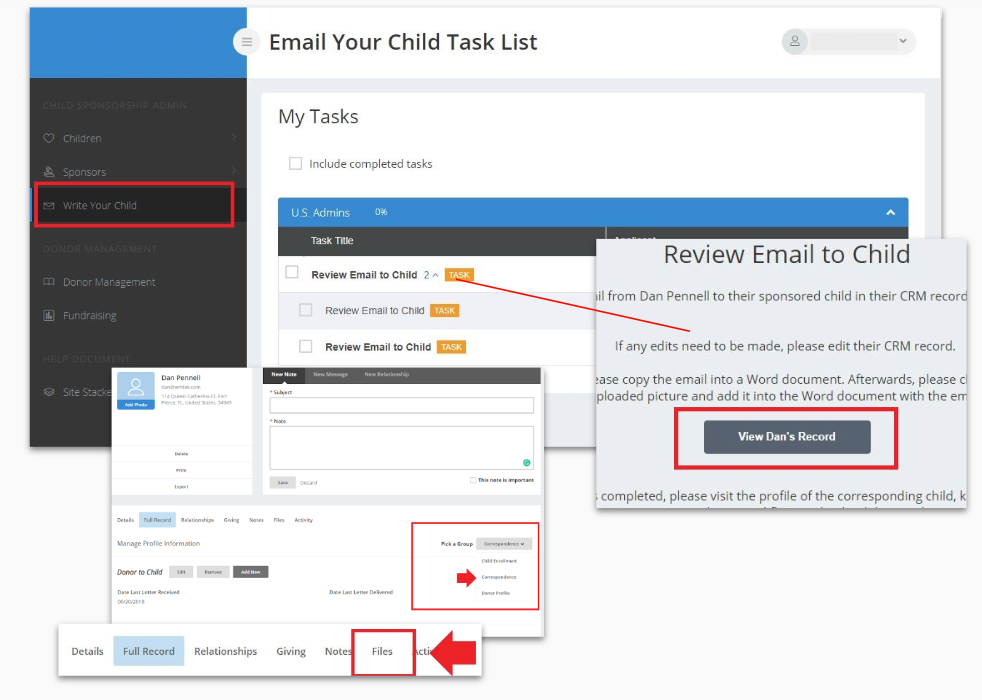
- From your Dashboard click Write Your Child in the main menu.
- Click on the Review Email to Child task and then click on the Sponsors’ record.
- Click the Full Record tab and click the Pick a Group dropdown and choose Correspondence.
- This will show you the sponsor’s letter that can now be copied and emailed to the field representative and then to the child. If the sponsor has sent a file or an image, it can be found in the Files tab.
- After completing the task, you can now go back to the Write Your Child page and click the Kickoff Started button to close the task.
Updated on: 02/04/2026
Thank you!