How to setup a link with a pre-filled campaign and amount
There maybe cases where you would want to send a link to your supporters that will take them straight to the checkout page with a specific campaign and amount is already pre-filtered. This can be done in Site Stacker by adding additional lines in your URL that you send them.
The URL for this to work should be in this format:
https://{domain}/p/Contributions/Contributions/addToCart?campaign_id=73&amount=50
Arguments supported (each one separated by '&')
campaign_id=
external_id=
recurring=yes
amount=
Notes=(string)
recurring_start_date=(YYYY-MM-DD) *requires recurring=yes
extra_data= (if extra data is displayed)
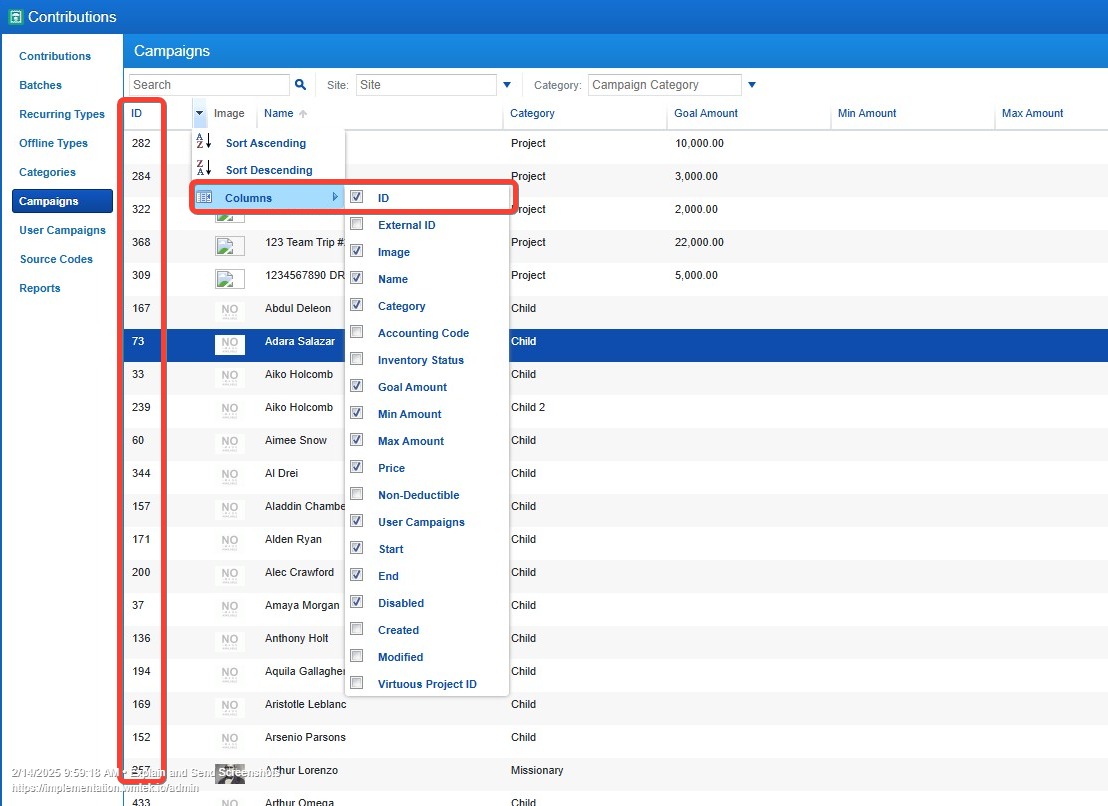
The example above will redirect the user to the checkout page with a specific campaign, in this case, campaign ID 73 (Adara Salazar) with a set amount of $50. The campaign ID can be found in the /admin side > Contributions >Campaigns. The ID column will need to be exposed in the table for you to get the correct campaign ID for that campaign you want to set in your link.
Updated on: 14/04/2026
Thank you!